Zero-Downtime Kubernetes Upgrades on GCP (Including PostgreSQL)
Zero-Downtime Kubernetes Upgrades on GCP
How We Upgrade GKE (Including PostgreSQL) Without Maintenance Windows
Upgrading Kubernetes in production is one of those tasks that looks easy on paper and terrifying in reality—especially when databases are running inside the cluster.
In this post, we share how our DevOps team performs near zero-downtime Kubernetes upgrades on Google Cloud Platform (GCP) using GKE, even with PostgreSQL running as a StatefulSet. This is not theory—this is a repeatable production runbook.
What “Zero Downtime” Means (Realistically)
Let’s be precise.
- No scheduled maintenance window
- No user-visible outage
- Applications may experience brief connection retries, but traffic recovers automatically
- Control plane, nodes, and workloads upgrade safely
This is the standard most modern SRE teams aim for—and it’s achievable with the right design.
Platform Context
Our setup:
- Google Kubernetes Engine (GKE Standard)
- Regional cluster
- Multiple node pools
- PostgreSQL running in Kubernetes
- Kubegres operator (1 primary, 1 replica)
- Applications connect via Service, not Pod IPs
The Core Strategy: Blue/Green Node Pools
Instead of upgrading nodes in place, we treat node upgrades like an application rollout.
Conceptually:
- Blue node pool → current production (Kubernetes 1.34)
- Green node pool → new nodes (Kubernetes 1.35)
Workloads are migrated deliberately, not evicted blindly.
Architecture Diagram
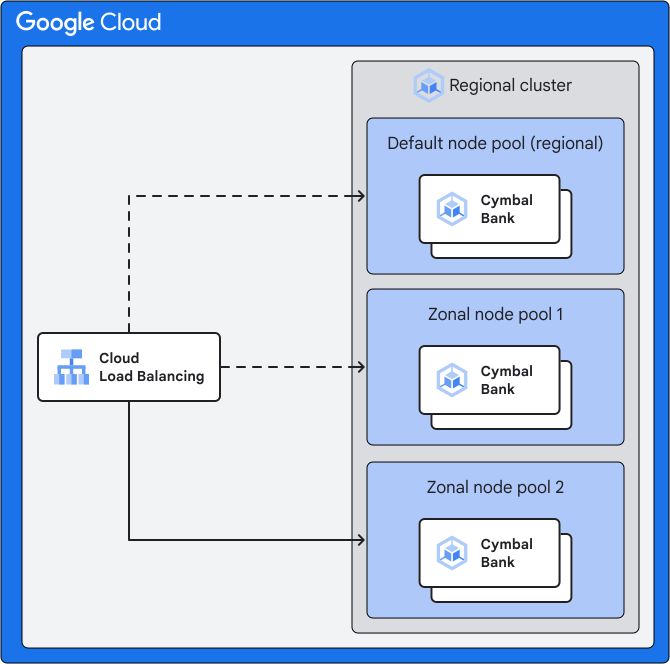
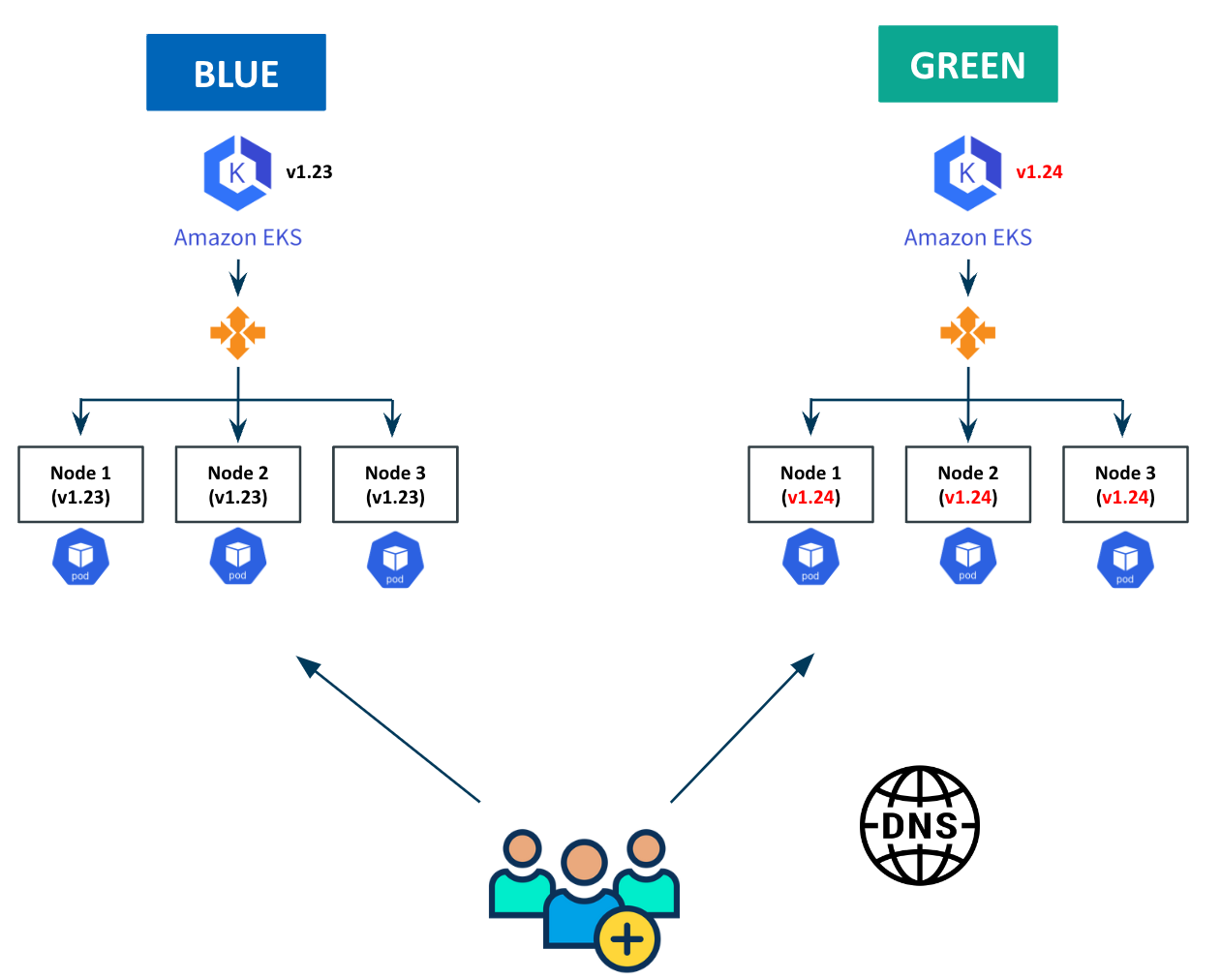
Flow overview
1
2
3
4
5
6
7
8
9
10
11
12
13
14
Users
  |
  v
GKE Load Balancer / Service
  |
  v
PostgreSQL Primary (Service)
  |
  +--> Replica (Blue)  ---> moved first
  |
  +--> Primary (Blue)  ---> moved last

Blue Node Pool  ----->  Green Node Pool
(K8s 1.34)             (K8s 1.35)
Step 0: Preconditions (Non-Negotiable)
1. PodDisruptionBudget
We protect the database from accidental mass eviction.
1
2
3
4
5
6
7
8
9
10
apiVersion: policy/v1
kind: PodDisruptionBudget
metadata:
  name: postgres-pdb
  namespace: db
spec:
  minAvailable: 1
  selector:
    matchLabels:
      app: postgres
2. Applications must retry database connections
Failover takes seconds. Clients must retry.
Step 1: Create the Green Node Pool
We create a new node pool running the target Kubernetes version.
1
2
3
4
5
6
gcloud container node-pools create green-135 \
  --cluster prod-cluster \
  --region europe-west1 \
  --cluster-version 1.35.x-gke.y \
  --machine-type e2-standard-4 \
  --num-nodes 2
Wait until nodes are ready:
1
kubectl get nodes -l cloud.google.com/gke-nodepool=green-135
Step 2: Force PostgreSQL Pods onto the Green Pool
Kubegres supports scheduling configuration. We apply node affinity so any restarted DB pod lands only on green nodes.
1
2
3
4
5
6
7
8
9
10
11
12
13
14
15
16
17
18
19
kubectl -n db patch kubegres my-postgres --type merge -p '{
  "spec": {
    "scheduler": {
      "affinity": {
        "nodeAffinity": {
          "requiredDuringSchedulingIgnoredDuringExecution": {
            "nodeSelectorTerms": [{
              "matchExpressions": [{
                "key": "cloud.google.com/gke-nodepool",
                "operator": "In",
                "values": ["green-135"]
              }]
            }]
          }
        }
      }
    }
  }
}'
This is the safety lock that makes everything predictable.
Step 3: Move the Replica First (No Impact)
We identify the replica:
1
2
kubectl -n db exec postgres-1 -- \
  psql -U postgres -tAc "select pg_is_in_recovery();"
Delete the replica pod:
1
kubectl -n db delete pod postgres-1
What happens:
- Pod restarts on green node
- Disk reattaches
- Replica resyncs
- Primary remains untouched
No client impact.
Step 4: Promote the Replica (Controlled Failover)
Kubegres supports manual promotion.
1
2
3
4
5
6
7
kubectl -n db patch kubegres my-postgres --type merge -p '{
  "spec": {
    "failover": {
      "promotePod": "postgres-1"
    }
  }
}'
What happens:
- Replica becomes primary
- Primary Service switches automatically
- Clients reconnect (brief retry window)
This is the only moment where connections may reset—usually a few seconds.
Step 5: Move the Old Primary
Now the old primary is just a replica.
1
kubectl -n db delete pod postgres-0
It restarts on green, attaches its disk, and joins replication.
At this point:
- Primary → green
- Replica → green
- Blue pool no longer hosts database pods
Step 6: Upgrade the Rest of the Cluster
Now that the database is safe:
Upgrade control plane
1
2
3
4
gcloud container clusters upgrade prod-cluster \
  --region europe-west1 \
  --master \
  --cluster-version 1.35.x-gke.y
Upgrade remaining node pools (with surge)
1
2
3
4
5
gcloud container node-pools update default-pool \
  --cluster prod-cluster \
  --region europe-west1 \
  --max-surge-upgrade 1 \
  --max-unavailable-upgrade 0
1
2
3
4
gcloud container clusters upgrade prod-cluster \
  --region europe-west1 \
  --node-pool default-pool \
  --cluster-version 1.35.x-gke.y
Step 7: Decommission the Blue Pool
Once everything runs on green:
1
2
3
gcloud container node-pools delete blue-134 \
  --cluster prod-cluster \
  --region europe-west1
Rollback is trivial until this step.
Why This Works
- No forced evictions
- Databases move last
- Failover is controlled, not accidental
- Services abstract pod identity
- Rollback is always possible
This pattern scales cleanly from stateless services to critical stateful systems.
Common Failure Modes We Avoided
| Mistake | Result |
|---|---|
| Upgrading nodes in place | DB restart + outage |
| No PDB | Simultaneous eviction |
| Pod IP connections | Broken clients |
| No retries | User-visible downtime |
| Single Postgres pod | Unavoidable outage |
When We Would Not Do This
If your requirements include:
- Absolute zero connection resets
- No failover logic in apps
- Minimal operational burden
Then Cloud SQL or AlloyDB is the better choice.
Running databases in Kubernetes gives flexibility—but demands discipline.
Final Thoughts
Zero-downtime Kubernetes upgrades are not about a magic flag.
They require:
- Architectural intent
- Blue/green infrastructure
- Explicit control of scheduling
- Applications designed for failure
On GCP, GKE gives you excellent primitives—but DevOps engineering turns them into reliability.
Want This as a Reference?
We use this runbook for every production upgrade.
If you want:
- a PDF version
- a step-by-step internal runbook
- a diagram-only executive summary
- or a conference talk version
Just say the word.